Cover Utils
Important
This is a combined replacement for foo_cover_info and
foo_cover_resizer. If you have either/both installed,
you must remove them first.
Note that this uses a separate database for front cover info storage so files would need scanning again. Also, different title format fields are used for display. See below.
Requirements
foobar20002.26.1or later. 32bit and 64bit are both supported.Windows 10or later.
Usage
There are 2 ways to use this component.
First of all, you can use the context menu on any playlist or library viewer selection.
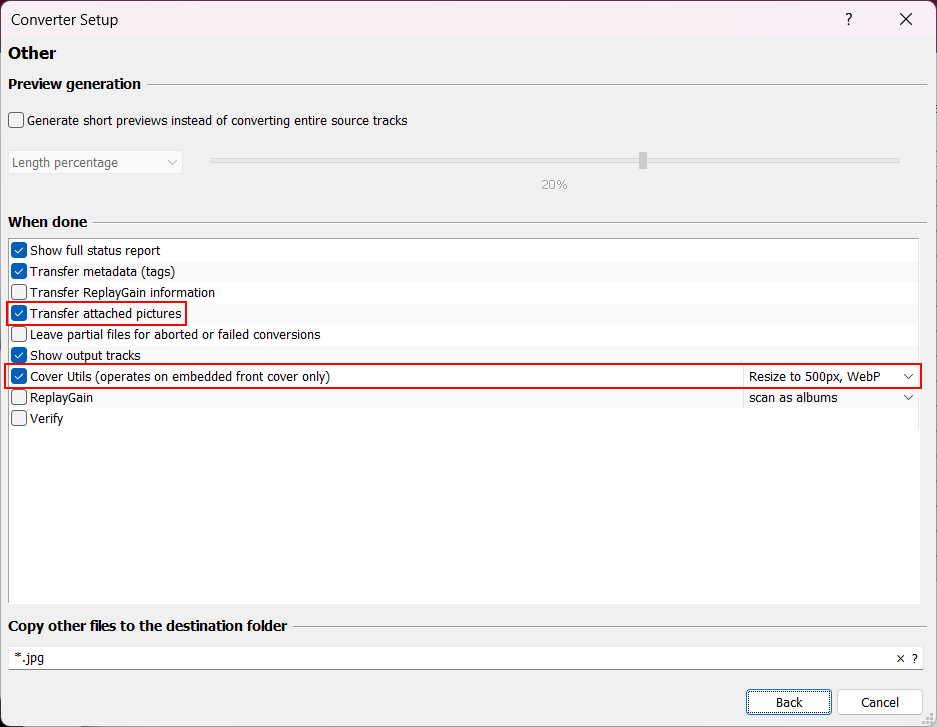
There is also a Post Convert action from the foobar2000 converter setup dialog.
Context menu
Use the right click menu on any playlist/library selection and you'll find
a Cover Utils sub menu.
Resize
This option will resize existing embedded art. Reading most common image
types is supported but you must choose JPG or WebP when saving.
Convert without resizing
Converts existing embedded art without resizing. You must choose
JPG or WebP.
Browse for file, resize and attach
This option lets you browse for an image file and will then resize it before attaching it to the current selection.
Browse for file, convert and attach
Use the file picker and then choose to convert the file to JPG or WebP.
Remove all except front
Since most people only want front covers, this is a handy method for removing all the other types.
Scan for Cover Info
Because it's not possible to query files for embedded album art within foobar2000, you can use this option to process a selection of files and store the results in a database.
Note
The component automatically tracks all updates to front cover
properties when using built in methods to add/convert/resize etc.
It's not possible to track changes from native foobar2000 album art
operations so if you do that, files would need re-scanning
manually.
Data is available in the following fields which are available wherever title formatting is supported.
| Field | |
|---|---|
%cover_utils_front_width% |
|
%cover_utils_front_height% |
|
%cover_utils_front_format% |
JPEG, PNG, WebP, etc. |
%cover_utils_front_size% |
Nicely formatted image size in KB/MB. |
%cover_utils_front_bytes% |
Raw image size. |
Note
Database records are attached to the %path% of each file. Records
are preserved if files are renamed/moved with File operations.
If files are renamed/moved externally, records would be orphaned and the files would need
scanning again.
Records have a lifetime of 4 weeks if they are
not included in the Media Library or playlist.
Example
Here's a custom column configuration that would show all information if present.
[%cover_utils_front_width%x%cover_utils_front_height%, %cover_utils_front_size%, %cover_utils_front_format%]
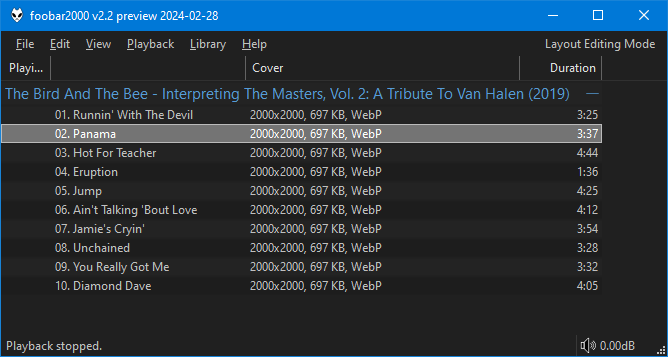
You can also perform playlist/library searches using query syntax like this:
Clear cover info
This clears all existing info for the current selection.
Converter
On the foobar2000 converter setup dialog under Other, you must ensure Transfer attached pictures is selected and then
you can choose to convert/resize when conversion is complete.
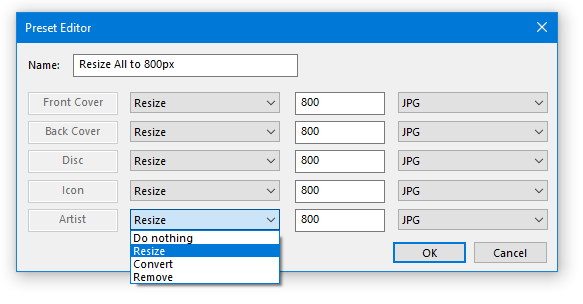
To make your own presets, you can head to the main Preferences page (File>Preferences>Tools>Cover Utils). After
adding, they will appear in the drop down list for selection.
Note
All changes to entries in the list are saved instantly. There is no undo!
Use the Add new button to create a new preset or double click an existing entry to edit.
The Preset Editor dialog should be self explanatory. You can configure what happens to
each and every image type independently.
Changes
1.10
- Fix
Post Converterbug where front cover info was not updated if the chosen action wasDo nothing.
1.9
- Bump minimum requirement to
foobar20002.26.1. This allows internal code and documentation to be simplified.
1.8
- This is a breaking change for
Post Converteraction users because previously saved settings will be lost. - Add
Preferencespage for creating your ownPost Converterpresets. See here. - Change internal
Resizemethod so images smaller than the specified target size are still processed/attached. - A global quality setting for
JPG/WebPencoding now exists underFile>Preferences>Tools>Cover Utils.
1.7
- Various
converterdialog improvments.
1.6
- Update to latest
foobar2000SDK. - Add converter dialog support.
1.5
- When
converting/resizingexisting images, you can now selectAllas an option instead of a singular type.
1.4
foobar20002.25is now required.Reload Infois now automatically triggered after batch operations so filesize changes are seen immediately.
1.3
- Update
WebPencoder to latest version. - Other internal improvements.
1.2
- Fix compatibility with future versions of
foobar2000.
1.1
- Bump minimum requirements to
foobar20002.24andWindows 10. - Compiled with the latest
foobar2000SDK.
1.0
- Initial release